Lesson 4 — Intermediate
Matplotlib se Graphs — Line, Bar aur Histogram
Numbers table me dikhte hain, trend graph me. Is lesson me hum sales data se teen real graphs banayenge — line (trend), bar (category comparison) aur histogram (distribution) — saare dark-theme visuals jo report me seedhe lag sakte hain.
Figure–Axes ka anatomy
WHAT
Matplotlib me Figure = poora canvas, Axes = ek plot area (jisme lines bhari jaati hain). OO style (fig, ax = plt.subplots()) production me preferred hai kyunki ek figure me multiple axes handle kar sakte ho.
WHEN
EDA ho, dashboard export ho, ya interview me "graph bana ke dikhao" — Matplotlib har Python data stack ka default renderer hai.
WHERE
Reports, Jupyter notebooks, seaborn (jo andar Matplotlib hi use karta hai), aur model training curves (loss vs epoch). Ek baar anatomy samajh lo, plotly/ggplot bhi jaldi seekh jaoge.
Line chart — monthly sales trend
import matplotlib.pyplot as plt
import numpy as np

months = ["Jan","Feb","Mar","Apr","May","Jun",
          "Jul","Aug","Sep","Oct","Nov","Dec"]
sales  = [42, 38, 55, 61, 58, 72, 69, 81, 77, 90, 95, 110]

fig, ax = plt.subplots(figsize=(10, 5), facecolor="#0d0d1c")
ax.set_facecolor("#0d0d1c")

ax.plot(months, sales, marker="o", linewidth=2.5,
        color="#f0a500", label="Monthly Sales (K)")

ax.set_title("Monthly Sales Trend 2026",
             color="white", fontsize=16, pad=12)
ax.set_xlabel("Month", color="#8a8aa3")
ax.set_ylabel("Sales (₹ 000)", color="#8a8aa3")
ax.tick_params(colors="#8a8aa3")
ax.legend(facecolor="#141428", labelcolor="white")
ax.grid(True, alpha=0.15)

plt.tight_layout()
plt.savefig("sales_line.png", dpi=150, bbox_inches="tight")
plt.show()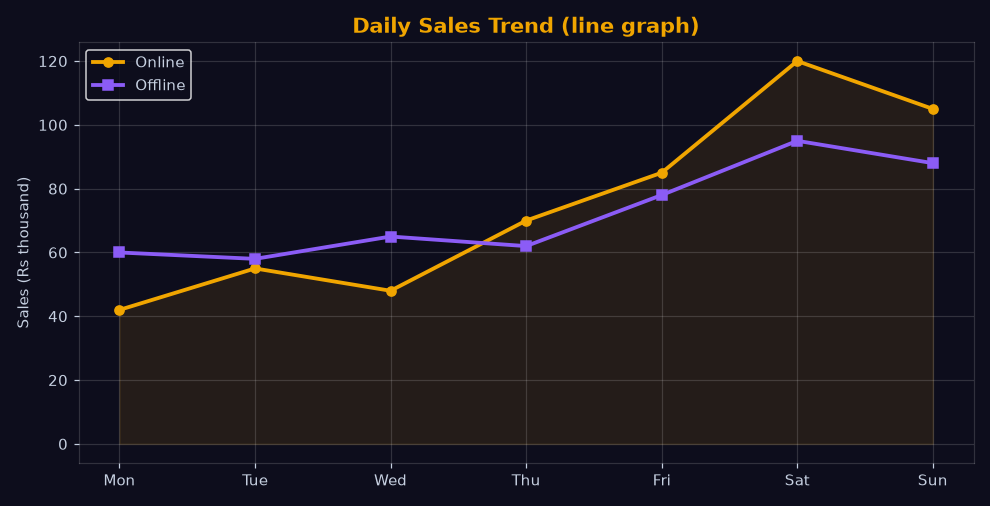
Bar chart — category comparison
categories = ["Electronics", "Fashion", "Grocery", "Home", "Books"]
revenue    = [420, 310, 520, 260, 140]

fig, ax = plt.subplots(figsize=(9, 5), facecolor="#0d0d1c")
ax.set_facecolor("#0d0d1c")

bars = ax.bar(categories, revenue,
              color=["#f0a500", "#8b5cf6", "#2dd4bf",
                     "#f0a500", "#8b5cf6"],
              edgecolor="rgba(255,255,255,.15)")

# Har bar pe value label
for b in bars:
    ax.text(b.get_x() + b.get_width()/2, b.get_height() + 8,
            f"₹{b.get_height()}K", ha="center",
            color="white", fontsize=10, fontweight="bold")

ax.set_title("Category-wise Revenue", color="white", fontsize=16)
ax.tick_params(colors="#8a8aa3")
ax.grid(axis="y", alpha=0.12)
plt.tight_layout(); plt.show()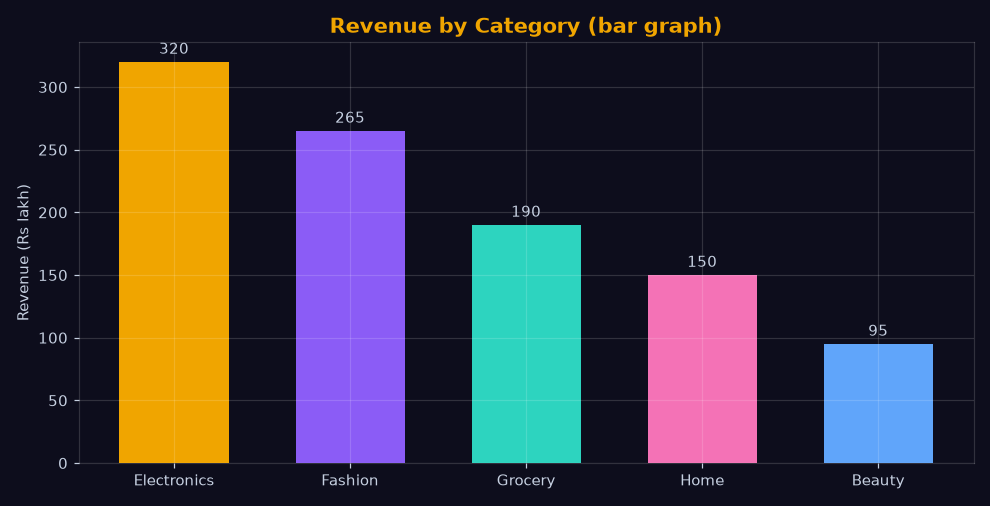
Histogram — distribution samajho
np.random.seed(42)
order_values = np.random.lognormal(mean=5.6, sigma=0.6, size=2000)

fig, ax = plt.subplots(figsize=(9, 5), facecolor="#0d0d1c")
ax.set_facecolor("#0d0d1c")

ax.hist(order_values, bins=40, color="#2dd4bf",
        edgecolor="#0d0d1c", alpha=0.9)
ax.axvline(np.mean(order_values), color="#f0a500",
           linestyle="--", linewidth=2, label=f"Mean ₹{np.mean(order_values):.0f}")

ax.set_title("Order Value Distribution", color="white", fontsize=16)
ax.set_xlabel("Order Value (₹)", color="#8a8aa3")
ax.set_ylabel("Count", color="#8a8aa3")
ax.tick_params(colors="#8a8aa3")
ax.legend(facecolor="#141428", labelcolor="white")
plt.tight_layout(); plt.show()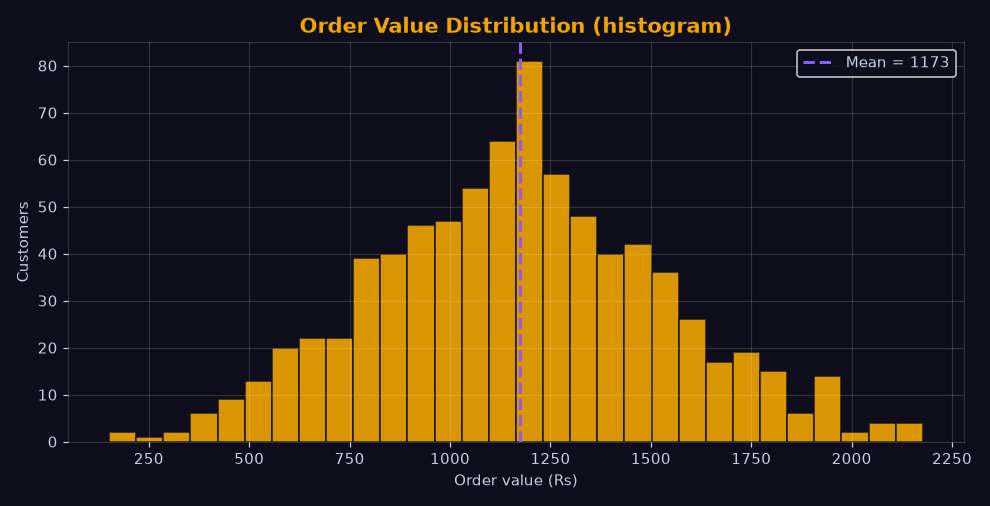
Chart choice guide
- Trend over time → line chart (time axis hamesha x pe).
- Category compare → bar chart (horizontal jab labels lambe hon).
- Distribution → histogram / KDE.
- Relationship do numeric → scatter (agla lesson).
- Single big number → bar ya KPI text — pie avoid karo (5 se zyada slice kabhi nahi).
savefig(..., dpi=150, bbox_inches="tight") se save karo — slide me extra white margin nahi aata. Title + axis label + legend teenon zaroori hain; "graph kya dikha raha hai" bina label ke interviewer khud guess nahi karega.Exercise
Question: Matplotlib me poore canvas (plot areas ke container) ka kya naam hai? (6 letters)
Question: Distribution dikhane wala 4-letter Matplotlib function (bins ke saath)?
Common mistakes
- Titles ke bina graphs: Sahiya title/label/legend ke bina graph ka meaning khatam.
- Default rcParams: White bg dark report me chipak jaata hai —
facecolorset karo ya style sheet use karo. - plt.show() se pehle tight_layout miss: Labels kat jaate hain, clipped text aata hai.
- Bar pe 10 categories: 10+ bars me comparison mushkil — top-5 + "Others" karo.
Lesson ho gaya? Ab next pe chalte hain — Seaborn Statistical Plots.