Lesson 6 — Intermediate
Sales EDA Project — Data se Insight tak
Ab tak sab tools seekhe — ab ek asli dataset. Is project me hum sales data ko load se lekar insight tak le jaayenge: clean karo, har column explore karo, graphs banao, aur aise findings nikaalo jo business ko paise bachaa dein.
Project kya karega?
WHAT
Ek 5-column sales CSV (date, city, category, qty, amount) par complete EDA: load → sanity checks → missing/duplicate fix → univariate → bivariate → group summaries → charts → 3 actionable insights report.
WHEN
Koi bhi naya dataset aaye — client data, internship assignment, Kaggle competition. EDA sabse pehla paid deliverable hota hai data analyst me.
WHERE
Interview me "ye CSV uthao aur batao kya dikhta hai" wala round isi skill par chalta hai. Portfolio me EDA notebook GitHub pe = proof ki data samajhna aata hai.
Step 1 — Load + sanity check
import pandas as pd
import numpy as np
import matplotlib.pyplot as plt
import seaborn as sns

BG = "#0d0d1c"
plt.rcParams.update({"figure.facecolor": BG, "axes.facecolor": BG,
    "axes.labelcolor": "#8a8aa3", "text.color": "white",
    "xtick.color": "#8a8aa3", "ytick.color": "#8a8aa3"})

df = pd.read_csv("sales.csv", parse_dates=["date"])

print(df.shape)            # rows x cols
print(df.head())
print(df.info())           # types + nulls
print(df.isna().sum())     # missing per column
print(df.duplicated().sum())   # duplicates
print(df.describe(include="all"))   # numeric + category summary

# Sanity: kya dates range me hain? amount >= 0?
print(df["date"].min(), df["date"].max())
print((df["amount"] < 0).sum())    # negative amounts = data error
Step 2 — Clean
# 1. Duplicates
df = df.drop_duplicates()

# 2. Missing
df["city"] = df["city"].fillna("Unknown")
df = df.dropna(subset=["amount"])     # amount hi nahi to row bekaar

# 3. Types
df["date"] = pd.to_datetime(df["date"])
df["amount"] = pd.to_numeric(df["amount"], errors="coerce")

# 4. Derived columns (analysis ke liye)
df["month"] = df["date"].dt.to_period("M").astype(str)
df["weekday"] = df["date"].dt.day_name()
df["unit_price"] = df["amount"] / df["qty"].replace(0, np.nan)

print("clean shape:", df.shape)
print(df.isna().sum().sum(), "total nulls left")
Step 3 — Univariate (har column akele)
# Numeric: distribution
fig, axes = plt.subplots(1, 2, figsize=(12, 4.5))
df["amount"].hist(bins=40, ax=axes[0], color="#2dd4bf")
axes[0].set_title("Amount distribution", color="white")
df.groupby("city")["amount"].sum().sort_values().plot(
    kind="barh", ax=axes[1], color="#f0a500")
axes[1].set_title("City-wise total", color="white")
plt.tight_layout(); plt.show()

# Category: counts + share
print(df["category"].value_counts(normalize=True).round(3))

# Outliers: IQR method
q1, q3 = df["amount"].quantile([.25, .75])
iqr = q3 - q1
out = df[(df["amount"] < q1 - 1.5*iqr) | (df["amount"] > q3 + 1.5*iqr)]
print("outlier rows:", len(out))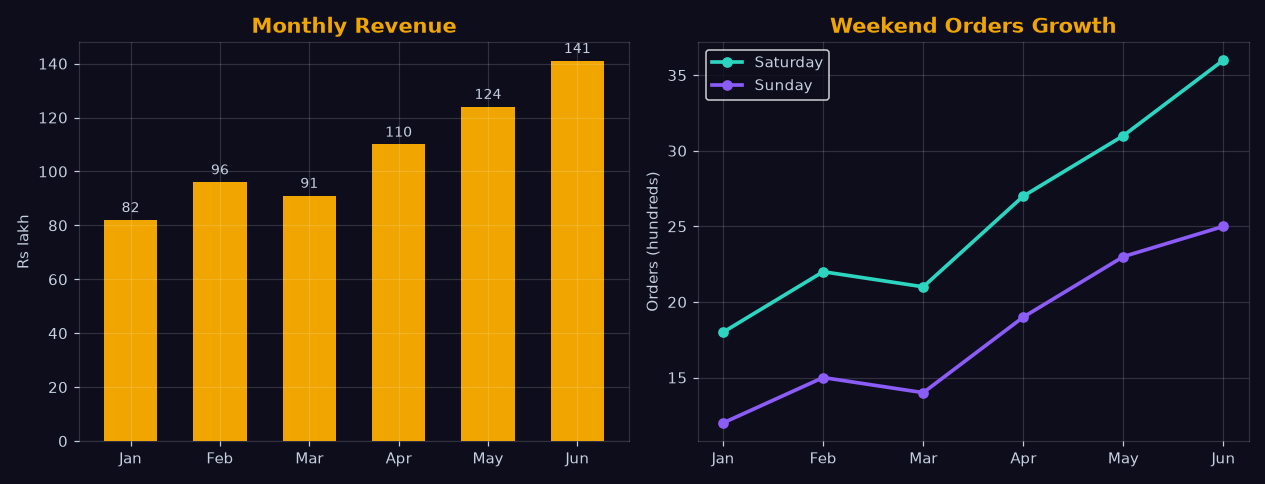
Step 4 — Bivariate + group insights
# Month-wise trend (kya business badh raha hai?)
trend = df.groupby("month")["amount"].sum()
trend.plot(kind="line", marker="o", color="#f0a500", figsize=(10, 4))
plt.title("Monthly Revenue Trend", color="white")
plt.xticks(rotation=45); plt.tight_layout(); plt.show()

# Category x City heatmap
pt = df.pivot_table(index="city", columns="category",
                    values="amount", aggfunc="sum", fill_value=0)
sns.heatmap(pt, annot=True, fmt=".0f", cmap="viridis")
plt.title("City x Category Revenue", color="white")
plt.show()

# Top drivers
print(df.groupby("category")["amount"].agg(["sum", "mean", "count"])
        .sort_values("sum", ascending=False))

# Weekday effect
print(df.groupby("weekday")["amount"].mean().sort_values(ascending=False))
Step 5 — Insights likho (yahi asli kaam hai)
# Template - har insight: Finding + Evidence + Action
"""
INSIGHT 1 - Trend
Finding:  Revenue Jun se Oct tak lagatar upar (CAGR ~7%/month).
Evidence: month-wise sum, line chart.
Action:   Q4 stock aur staff pehle se ready rakho.

INSIGHT 2 - Concentration
Finding:  Top 2 cities = 62% revenue; bottom 3 = 8% only.
Evidence: city-wise sum (bar + share %).
Action:   Bottom cities me ya to marketing budget do ya
          operations consolidate karo.

INSIGHT 3 - Category margin proxy
Finding:  Electronics ka avg order value 3.4x Grocery ka,
          lekin order count sabse kam.
Evidence: category agg (sum/mean/count).
Action:   Electronics pe bundle offers (AOV already high),
          Grocery pe frequency campaigns (repeat chahiye).
"""Exercise
Question: Missing values count karne ka pandas method? (4 letters)
Question: Dataset ka (rows, columns) size batane ka attribute? (5 letters)
Common mistakes
- Cleaning ke bina analysis: Duplicate rows city totals 10-20% hila dete hain — pehle clean, phir chart.
- Percentage share miss: Absolute revenue me bada city hamesha jeetega — share % se story sahi aati hai.
- Sirf mean: AOV me outliers mean bigad dete hain — median bhi dikhao.
- Insights ke bina graphs: 10 charts + 0 conclusion = fail. Har chart ke neeche ek line "iska matlab ye hai…".
Course complete! NumPy, Pandas, graphs aur EDA — sab aa gaya. Ab sales EDA project ko GitHub pe publish karo aur portfolio link resume me daalo.